MULTIBOOT WINDOWS 7-11
USING DISM or VHD / WIM
A couple of tips on how to use DISM and EasyBCD to make the process of multibooting Windows 7, 8, 10, 11
a little easier and also a comment or two on using VHD and WIM files for booting.
Mutlibooting these OSs is a breeze compared to earlier Windows versions as they're essentailly the same as
far as their boot process goes and so very easy to mix'n'match on multiboot.
The tips below should help you if you want to multiboot or add VHD / WIM boot options to these OSs.
Give it a shot, even if just out of curiosity and see what you think.
Easy peasy.
Multiboot Windows 7-11 using DISM Installs:
Use DISM to apply the Windows image directly to a partition and then update the Windows BCD store on the
boot partition with a tool such as NeoSmart's EasyBCD or BoYans VisualBCD - or the Command prompt for all
you diehards.
Using DISM allows for a quick Windows install and I now use it for my w7-10-11 multiboot installs. I wish I'd
discovered it 5 or 10 years ago but better late than never.
I'm not going to go into all the detail of the DISM or Diskpart commands here (there are only a few of each)
as there are already about 482,743 videos on YouTube covering this method.
Check the BrenTech or Memory or CyberCPU or Britec09 or [. insert name here .] YouTube channels.
On the first install - typically to the partition known as C: - after applying the image from the install ISO/USB
using DISM you'll need to make the partition bootable which you can do by exiting DISM and selecting your
partition "C:" and then using the command: "c:\Windows\System32\bcdboot c:\Windows".
Windows will then install all required boot files into the root of C:\ and doing this removes the need for a
dedicated boot partition.
All subsequent Windows 7-11 installs in either primary or logical partitions can then be done using DISM
without the need to run the bcdboot command in the root of the partition.
You simply add the new install(s) to the existing boot menu (bcd store) on C: by using either the "bcdedit"
command in Windows, which provides lots of fun opportunities for unexpected boot experiences dut to sticky
fingers, or do it the easy way and use the very easy to use EasyBCD software from NeoSmart (my choice).
(Penguin tragics moving away from the dark side will, no doubt, spudge widgets and makefile chain loaders
in Rust to bootlace free blocks in the VBR because why do it the easy way when you can do it the hard way).
The DISM / EasyBCD method in a pretty easy-peasy method to apply Windows 7-11 installs and it also makes
the use of logical partitions for additional Windows installs no-fuss and often, especially for PCs that are a few
years in use, logical partitions are all that's available (without dramatically re-organising the existing setup).
A note about the Windows 11 minimum PC requirements nonsense for secure boot / TPM / CPU.
I've only installed Windows 11 IOT LTSC for testing which doesn't have those requirements, so I can't say
whether the Windows 11 Home / Pro / etc versions will object to PCs that don't meet those requirements
during the OOBE on first startup - I expect there's a 50/50 chance of Home / Pro spitting the dummy.
Give it a try and let me know how the Home / Pro install works as far as the minimum requirements go.
And - a benefit to DISM is that you bypass the installer's minimum space requirements check. I've not tested
how low you can go with HD size as I normally use 60GB SSDs for Windows 10-11, a bit on the generous side
(the minimum HD size for Win 11 IOT LTSC is 16GB). It'd be interesting to know how low you can go.
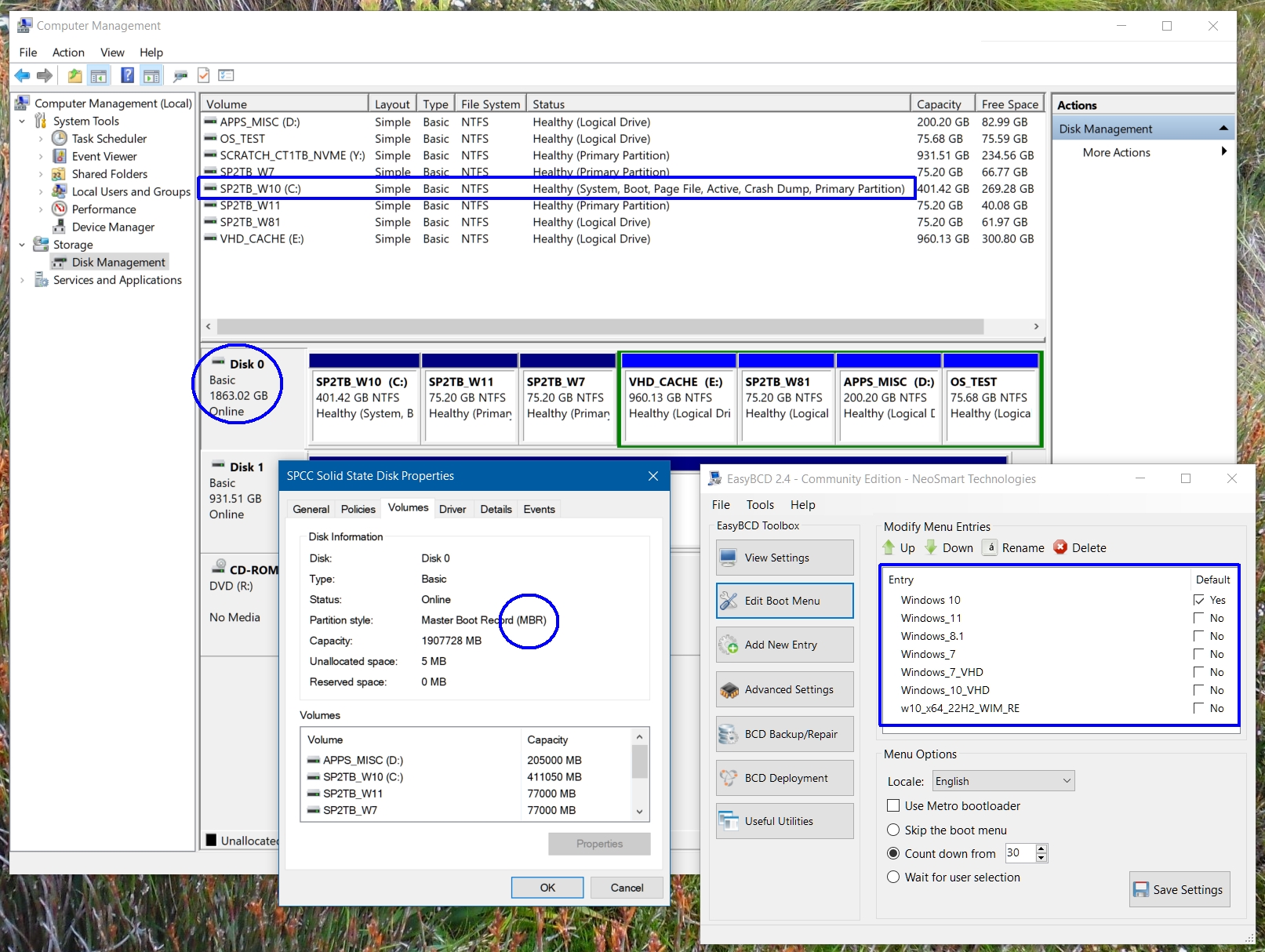
Here's a screenshot of a w7-8.1-10-11 install on 1x2TB MBR SSD done using the DISM method. Windows 8.1
runs from a logical drive using the bcd store on C:
Note the lack of separate System / MS Reserved / Recovery partitions (open in new tab for larger view).
Multiboot Windows 7-11 using VHD/WIM Installs:
There are also other options for multibooting Windows 7-11 installs, one being the VHD/WIM boot method
which works well enough, although I'm unconvinced this offers any great advantage over a VM+VHD setup.
While you could do this natively, I use EasyBCD as bcdedit is not the most intuitive tool.
To boot from a VHD:
Create a Windows 7-11 VHD whichever way you prefer and add it to the Windows boot menu using EasyBCD.
There are several options available for creating a VHD and an easy way is using virtualisation software such as
VirtualBox but just be aware you'll need to Sysprep the image ready for use on a PC.
Another easy option is virtualise your current Windows install using a tool such as DisktoVHD from Sysinternals
or Starwind converter and in either case no Sysprep is needed.
Another way is to use Windows Disk Management to create/attach/initialise/format the VHD then use DISM to
apply a Windows WIM image to it and then make the install bootable using bcdboot - this command will also
add a boot entry into the bcdstore for the VHD OS.
You could also do a clean install to a small SSD attached to the PC and then virtualise the SSD using either
Disk2VHD or Starwind converter (faster than Disk2VHD) and again, no Sysprep is needed.
To boot from a WIM:
Extract a bootable WIM image from a Windows 7-11 installer image and add it to boot menu using EasyBCD.
There are typically 3+ WIM images in a Windows setup image file (ISO, USB installer, etc.):
"Boot.wim" which is bootable and runs the Windows setup shell (PE)
"WinRE.wim" (typically in the "Install.wim") which is bootable and runs the Windows Recovery shell (PE)
"Install.wim" usually multiple versions in the Sources folder - these install WIM images are not bootable.
You could also use DISM to virtualise your current OS into a WIM image file, similar to using Disk2VHD.
On my setup I've taken the easy option and used a Windows 10 recovery WIM for testing.
In use:
Both VHD and WIM images boot just fine and boot up in around the same time as a typical Windows boot.
I haven't tried native boot, that is, creating a Windows 7-11 boot partition only without an OS install and then
adding VHD or WIM entries to the Windows bcd store (using bcdedit) as I don't see a benefit to that method.
I install an OS and then add VHD and WIM entries to the boot menu using EasyBCD as I find that simpler.
I also don't have much need to boot VHDs from the Windows boot menu as I normally use VirtualBox for
VHD booting as VirtualBox offers a better management interface than EasyBCD (especially with 300+ VHDs).
I've a couple of VHD boot options on my current setup above, done more out of curiosity than anything else.
VHDs offer a handy "disposable OS" approach that is useful if you want to explore sketchy websites.
But - VirtualBox is a much more secure approach than Windows native booting, as it doesn't expose any other
part of your PC or network to possible risks (as long as you don't use the "shared drive" feature in VirtualBox).
Again - check the BrenTech / Memory / CyberCPU / Britec09 / [. insert name here .] YouTube channels for tips.
Anyhoo, give it a shot - it isn't rocket science.
Kind regards,
Shotter_Nail
< Go Back